Overview
We asked Google's own Gemini AI what are the best HVAC psychrometric chart software tools on the market. Here are the results that we were quite pleased with:
In the HVAC industry, "best" often depends on whether you need a high-end engineering tool for client-ready reports or a quick, free calculator for field use. As of 2026, the following desktop software options are considered the industry standards for psychrometric analysis:
1. ASHRAE Psychrometric Analysis (Highest Industry Standard)
ASHRAE’s official software is the "gold standard" for professional engineers. It is frequently updated to align with the latest ASHRAE Standards (55, 62.1, and 90.1).
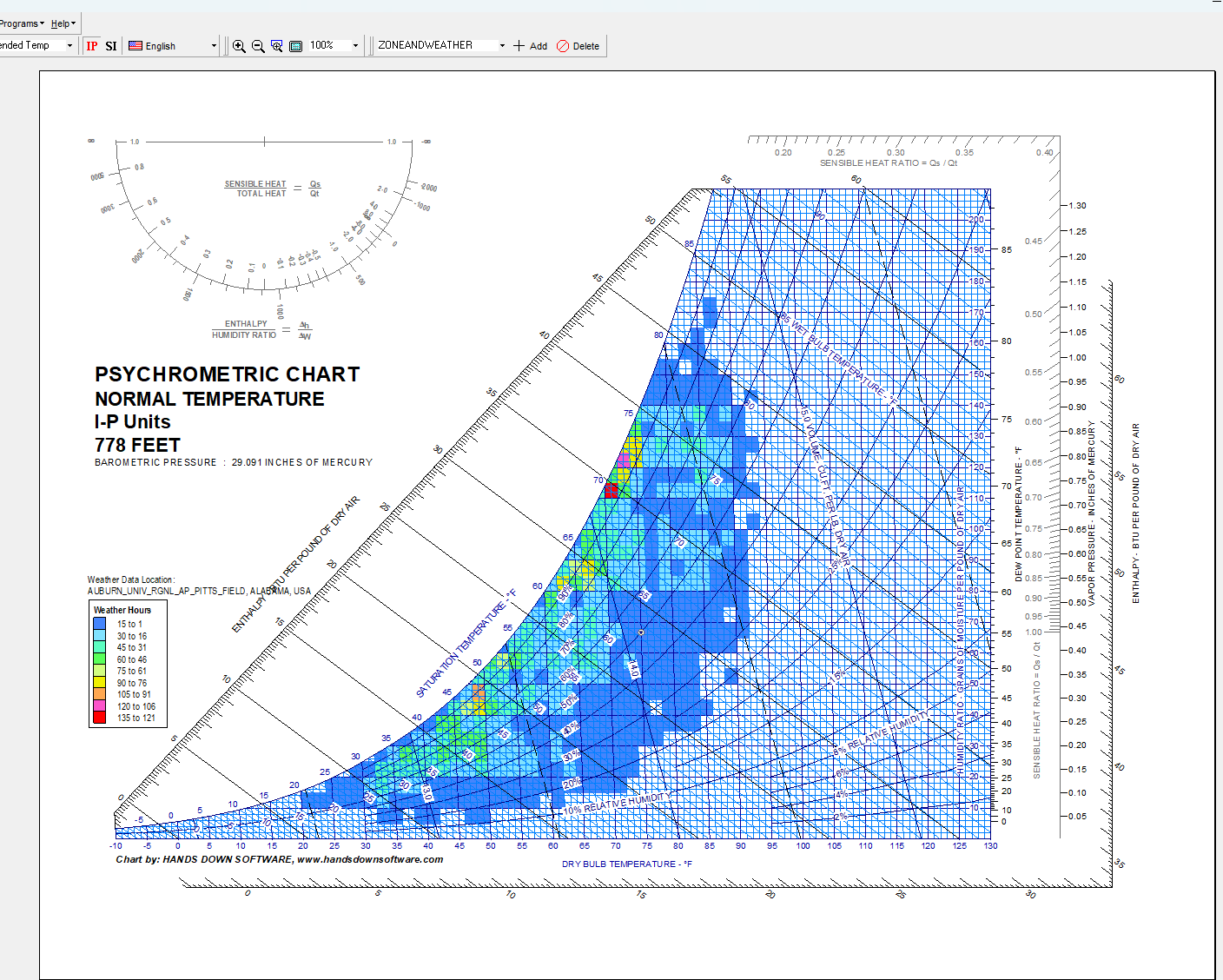
Developed by Hands Down Software (now part of Carmel Software), HDPsyChart is widely considered the most user-friendly professional desktop application.
Also part of the Hands Down Software family, Akton is the "heavy-duty" version of HDPsyChart.
Daikin offers a surprisingly robust desktop tool free of charge.
While primarily known as a mobile app, it is often cited by engineers as the best tool for "on-the-fly" calculations due to its high accuracy (using ASHRAE equations).
In the HVAC industry, "best" often depends on whether you need a high-end engineering tool for client-ready reports or a quick, free calculator for field use. As of 2026, the following desktop software options are considered the industry standards for psychrometric analysis:
1. ASHRAE Psychrometric Analysis (Highest Industry Standard)
ASHRAE’s official software is the "gold standard" for professional engineers. It is frequently updated to align with the latest ASHRAE Standards (55, 62.1, and 90.1).
- Best For: Professional consulting engineers and LEED projects.
- Key Features: Near-exact replication of ASHRAE Charts 1–7, support for both IP and SI units, and the ability to plot complex processes with energy calculations.
- 2025/2026 Updates: Version 9.0 includes data from the 2021 ASHRAE Handbook—Fundamentals and weather data for over 9,100 cities worldwide.
Developed by Hands Down Software (now part of Carmel Software), HDPsyChart is widely considered the most user-friendly professional desktop application.
- Best For: HVAC design, process analysis, and professional presentations.
- Key Features: It allows for highly customizable charts (colors, line weights, etc.) and includes over 20 additional HVAC calculation programs. It can export professional-grade state point and process reports to PDF or Excel.
- Capability: It handles altitudes from 0 to 12,000 ft and includes ASHRAE Datacenter Zones (2011) and Thermal Comfort Zones.
Also part of the Hands Down Software family, Akton is the "heavy-duty" version of HDPsyChart.
- Best For: Industrial applications, high-altitude design, or high-temperature/high-pressure processes.
- Key Features: It covers much wider temperature and pressure ranges than standard HVAC charts, making it essential for specialized manufacturing or high-altitude aerospace engineering.
Daikin offers a surprisingly robust desktop tool free of charge.
- Best For: Engineers on a budget who still need a professional visual interface.
- Key Features: It supports both Psychrometric and Mollier diagrams, zoom functionality, and the ability to save points. While the interface is sometimes described as less modern than paid options, it is accurate and reliable.
While primarily known as a mobile app, it is often cited by engineers as the best tool for "on-the-fly" calculations due to its high accuracy (using ASHRAE equations).
- Best For: Rapid load calculations (sensible, latent, total) without needing to plot a full chart manually.
- Note: If you need a full visual chart to print for a design set, stick with HDPsyChart or ASHRAE.
| Software | Primary Advantage | Best Use Case |
| ASHRAE Analysis | Maximum Compliance | Official engineering reports & LEED |
| HDPsyChart | Customization & Ease | Daily HVAC design & client presentations |
| Akton | Extreme Ranges | Industrial drying, high-temp/high-alt |
| Daikin Viewer | Free & Professional | Budget-conscious professional design |
| Munters | Speed/Accuracy | Field work and quick load checks |